
Rolling Values Using Formula
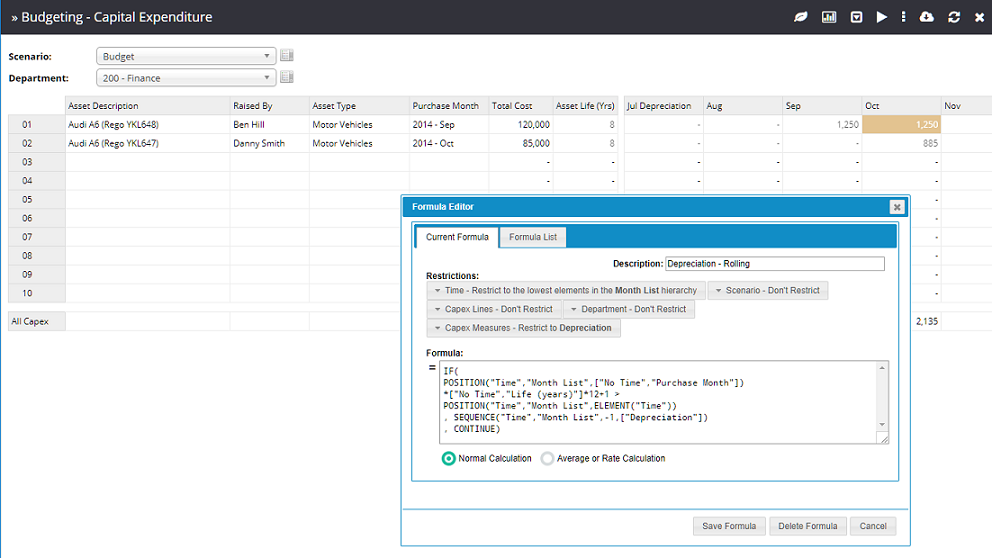
Rolling balances and depreciation calculations can be implemented using the SEQUENCE workview function.
| Function | Description |
|---|---|
| SEQUENCE | The sequence function returns data from a specified relative location in the same cube but changes one element from one dimension based on a relative position number and a hierarchy. Syntax: SEQUENCE("DimName", "HierarchyName", PositionalChange, ["Relative Cell"])Example: SEQUENCE("Time", "Month List", -1, ["Closing Balance"])This example will return the closing balance of the previous month. |
| ISLEVELZERO | The isLevelZero function returns 1 if the element from the specified dimension has no child elements.Syntax: ISLEVELZERO("DimName") Example: IF( ISLEVELZERO("Time") = 1 , CONTINUE , 0 ) |
| ELEMENT | The element function returns the name of the element (excluding the hierarchy prefix) for the cell being evaluated. Syntax: ELEMENT("DimName")Example: ELEMENT("Time") |
| POSITION | The position function returns the index of an element within a specific dimension and hierarchy. Syntax: POSITION("DimName", "HierarchyName", "ElementName")Example: POSITION("Time", "Month List", "2017 - Jan") This example will return 1 if the element "2017 – Jan" is the first element in the "Month List" hierarchy. |
TIP
When using the sequence function, it is possible to create a circular reference. MODLR has some detection for circular references however if the circular loop spans enough distinct cube cells it will likely terminate the MODLR Instance. A log will be generated in this instance.
In the example above, a Forecast formula on the Sales cube reads the same month twelve periods back from the Actual scenario and uplifts it by 5%:
js
SEQUENCE("Date", "Month List", -12, ["Actual"]) * 1.05Its Restrictions confine it to the Forecast scenario. Every other dimension is left on Don't restrict, so it applies across all dates, brands, departments and products.
Formulas are evaluated top down, and the first one whose restrictions match a cell wins - so a more specific formula has to sit above a more general one to take effect.