
Restful API
All communication between the MODLR Gateway and the MODLR Instances are completed over the stateless RESTfull API. The requests are made by the Gateway service to each of the MODLR Instances. Developers each have full access to this API and can make requests of their MODLR Instances.
The MODLR Gateway service includes a page called the API Sandbox https://go.modlr.co/sandbox/ which provides a full list of API functions, descriptions and required arguments for use. This page allows API calls to be directly made against a MODLR Instance.
The API is available with 5 endpoints.
| Endpoint | Name | Description |
|---|---|---|
| /server.service | Server Service | Provides information and control from the MODLR Instance regarding available memory, storage capacity, users list, FTP server status and authentication. |
| /model.service | Model Service | Provides functions for managing the objects within a model. |
| /collaborator.service | Collaborator Service | Provides functions for accessing an application as a end user. |
| /datasource.service | Datasource Service | Provides functions for creating, updating and testing datasources. |
| /api.service | API Service | Provides an overview of the available API functions. |
Example calling the Server.Save function
The Sandbox is reached from the account menu in the top right. Pick a Service, then a Task within it - the request payload is built for you. Selecting server.save produces a payload with no empty properties, so the task needs no additional information to run.
TIP
The server save function instructs the MODLR Instance to save the objects it holds in memory to disk.
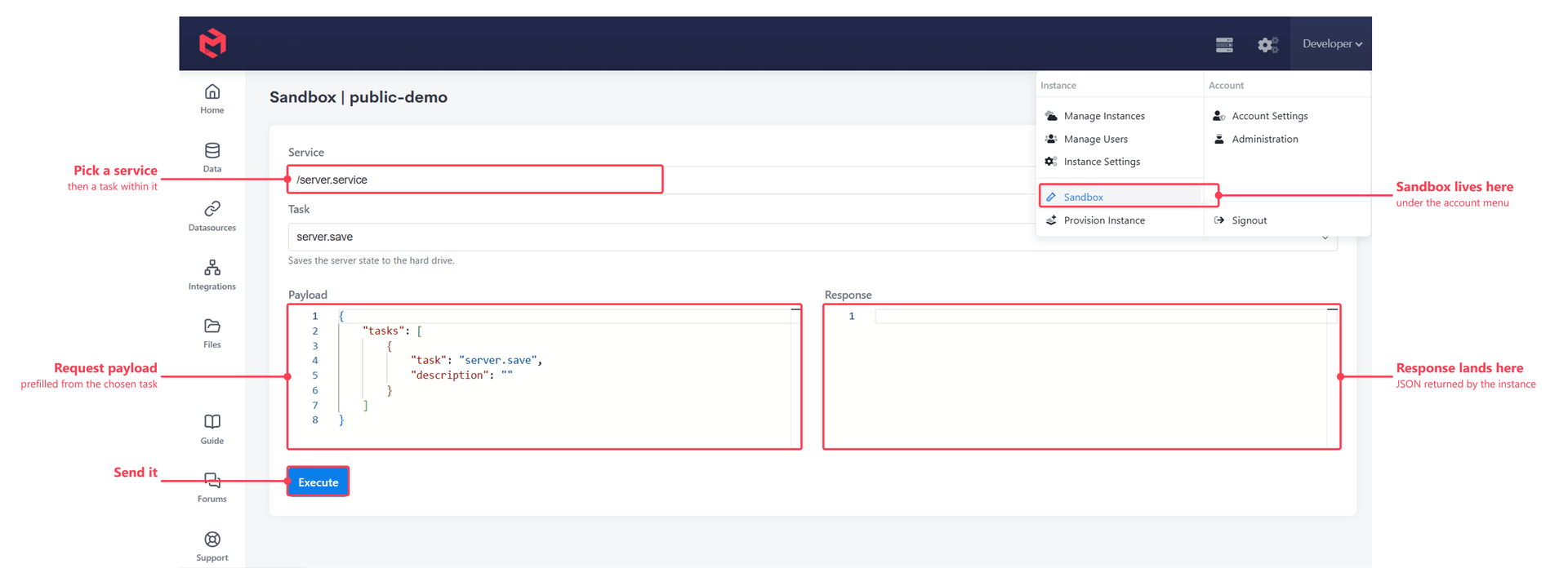
If the call button is pressed, the request is transported to the MODLR Instance which then executes the function and provides the results in JSON format.
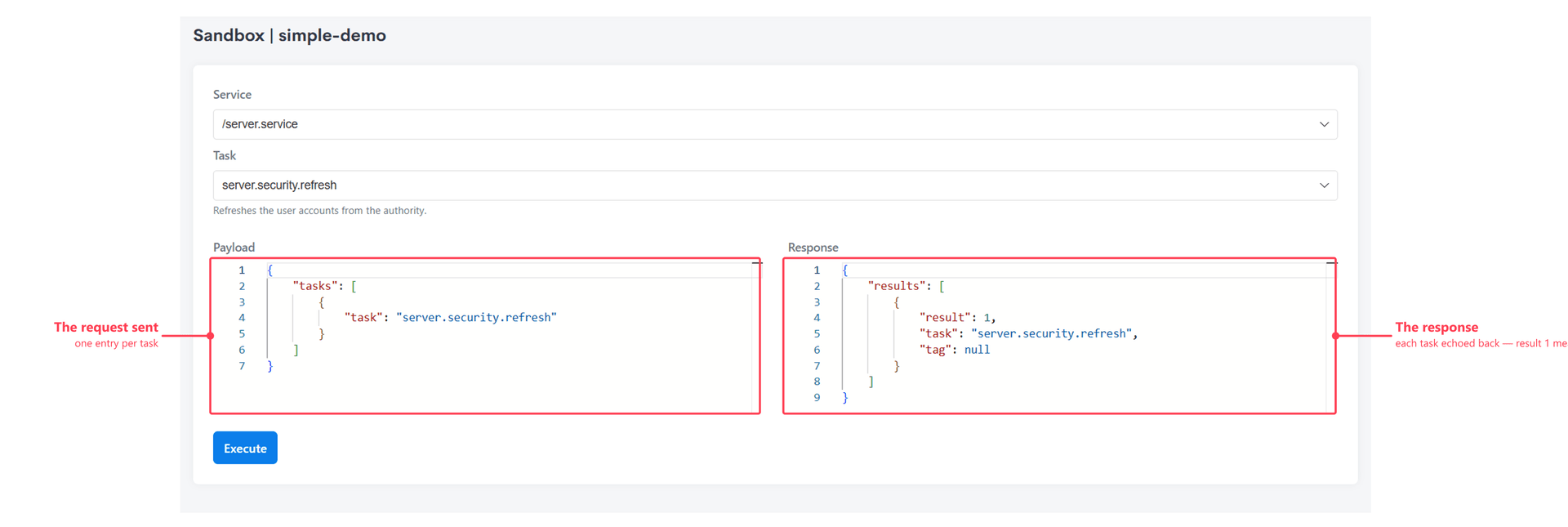
Common Tasks performed using the API Sandbox
There are many common development tasks that modellers can perform using the API Sandbox.
| Task | Service | Description |
|---|---|---|
| Task | Service | Description |
| server.save | Server | Instructs the MODLR Instance to save the objects it holds in memory to disk. |
| server.memory | Server | Returns the current available and used memory. |
| server.users | Server | Returns a list of users and their details. |
| security.refresh | Server | Refreshes the list of users and their associated authentication tokens. |
| storage.check | Server | Returns the current available and used disk space. |
| ftp.enable | Server | Enables the FTP Server. This will return the generic login details for a "writer" and a "reader" account. |
| ftp.disable | Server | Disables the FTP Server. |
| ftp.status | Server | Returns a result of "1" if the FTP server is enabled. Returns a result of "0" if the FTP server is not running. Returns the generic login details for "writer" and "reader" accounts. |
Calling the API from outside MODLR
The Sandbox lists the available functions and the arguments each one takes, which is enough for development work against your own instance. Calling the API from an external system is handled case by case: the authentication method and the credentials are issued per customer, and the reference material for the functions involved is provided directly rather than published here.
If you're planning to call the MODLR API from another system, contact the MODLR team and describe what you're trying to achieve. We'll provide the documentation for the functions involved, set up the authentication, and advise on the approach that fits the use case.
Reading MODLR data from another system
Where the goal is simply to get data out of MODLR into another system, the API is usually not the best route. The reason is less about the API itself than about what a bulk read asks of it.
The API is a function interface, not a query interface. There is no way to express "the rows I want" to it - you ask for a slice, and the engine resolves every intersection in that slice, evaluates any formulas behind those cells, builds the whole result and serialises it to JSON before the first byte comes back. Whatever filtering or aggregation the external system was actually after happens afterwards, at its end, so the full result gets produced and moved either way, in a payload several times the size of the values it carries. A dataset large enough to need chunking becomes many such requests, each one re-entering the engine, and "only what changed since last night" isn't something the interface can express - so most integrations end up re-exporting everything on every run. All of that runs on the instance's memory and processing, the same budget that serves Workviews, Cards, Excel refreshes and scheduled Processes, so a heavy export competes directly with the people using the model.
The recommended pattern instead is:
- Export the data you want to share into a Table in the instance's Internal Datastore. Utility.Export.Cube to Table does this for a Cube, writing one column per Dimension plus a value column, and can be re-run on a schedule to keep the Table current.
- Have the external system read that Table from the database directly. See Accessing MySQL Directly for creating a datastore user and opening the connection.
A database read behaves the opposite way in every respect that matters here. The external system is talking to MySQL, so it can push its filtering, joins and aggregation into the query itself - the work is done against indexes, and only the reduced result set crosses the wire rather than the whole export. Result sets stream as the client reads them, so a query over millions of rows costs about the same memory as one over a handful, instead of the entire payload being materialised first. Incremental pulls come down to a WHERE clause on a date column rather than a full re-export. And BI and ETL tools connect over JDBC/ODBC natively, with no custom client to write against a bespoke API.
Most importantly, all of that runs against the Internal Datastore's own memory allocation, separate from the in-memory model. However often or however hard the external system queries the Table, it takes nothing away from front-end users or from Processes running in the model. The only thing that touches the engine is the export itself - once, on a schedule you choose, and at a time you know is quiet.