
Variable
Variables are dynamic, custom holders of data that can be referred to within formulas using the VARIABLE() syntax.
Reserved variables
A number of variable names are already reserved and available without adding a Variable component yourself - user-id, table-row, list-first, and others scoped to specific components. See Reserved Variables for the full list.
INFO
Variable Referencing A variable cannot be referred to outside of the container that it lives in. If there are sub containers inside the container the variable lives in, it can be referred to in these sub containers. This is only the case
Common Use Properties
Name Property Determines the name of the variable to be used when referencing the variable.
Example: If the name is set to
var, the syntax used in formulas to refer to the value ofvarwill beVARIABLE("var")Value Property Determines the value of the variable.
Example 1: If
15was entered as the value for a variable namedvar, then references toVARIABLE("var")in formulas return15.Example 2: If
IF(ELEMENT("Month") = Jan, 1, 0)was entered as the formula value for a variable namedvar, then references toVARIABLE("var")in formulas where the Month element is Jan will return 1, otherwise references toVARIABLE("var")will return 0.Persist Property This determines the level within the card at which the variable can be referred to.
Yes If set to "Yes", the variable will be stored and shown in the card editor
VariablesPanel. Variables in this panel can be referred to globally in the card regardless of where the variable component is placed.No If set to "No", the variable cannot be referred to outside of the container that it lives in. If there are sub containers inside the container the variable lives in, it can be referred to in these sub containers.
Card Variables and Model Variables
The editor's Variables panel holds two separate sets, both readable from any formula in the card.
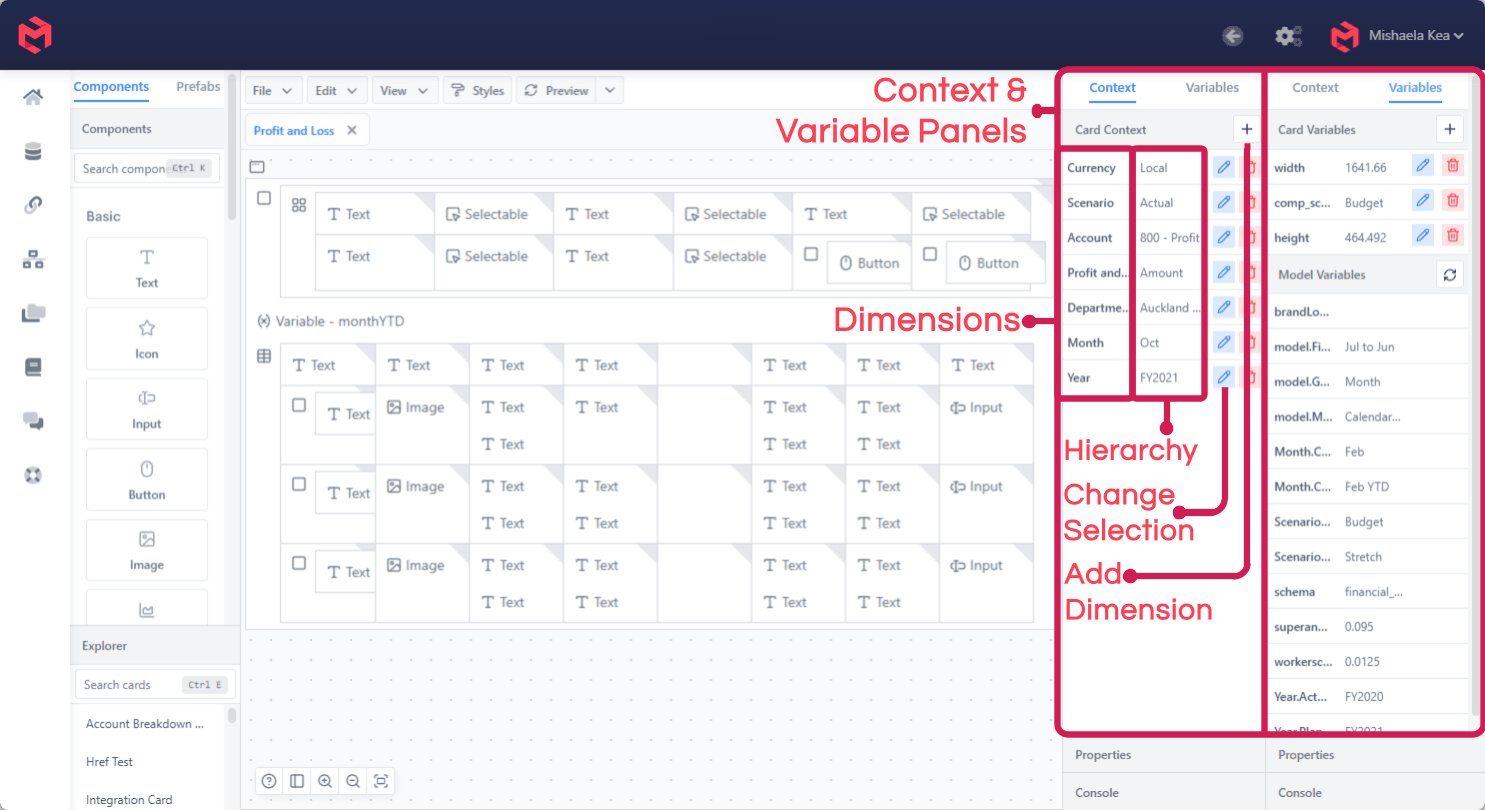
| Set | Scope |
|---|---|
| Card Variables | Defined on this card and local to it. Added with +, edited or deleted per row. |
| Model Variables | Defined once on the model and shared across every card, workview and process that reads them. Read-only here, with a refresh control to re-read them. |
Card Variables are where interactive state lives - a toggle's on/off value, a selected comparison scenario. Model Variables are for values maintained centrally, like the current planning scenario or a financial year start; see Model Variables for defining them.
Some variables are provided by MODLR rather than defined by anyone - the current user, the card's rendered dimensions - and are listed in Reserved Variables.